← All work
Shipped · live during service hours

Delivery Ops Alert System

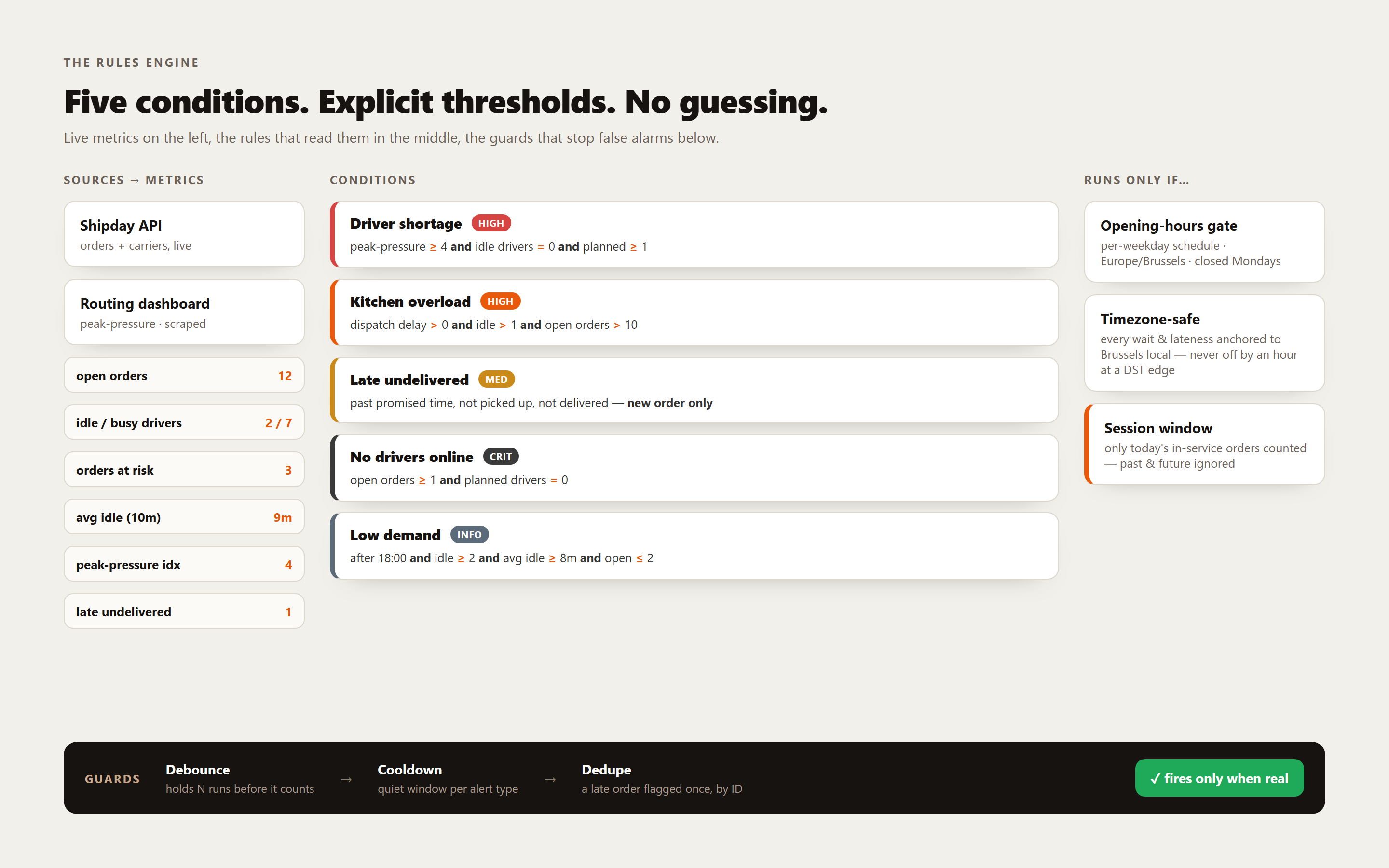
During a Friday rush nobody can watch a dashboard, yet that's exactly when drivers run short, the kitchen backs up, or an order quietly slips past its promised time. This is a headless n8n engine that watches for the store: every minute it fuses live delivery data with a routing-system read, scores five plainly-defined conditions, and only alerts when a problem is real, over the WhatsApp Official API the team already lives in.

n8nShipday APIWhatsApp Cloud APIGoogle SheetsOps automation
n8n · delivery ops alert engine
Delivery Ops Alert System screenshot

The challenge

The signals were live. Nobody had eyes to read them.

In a quick-service delivery kitchen, the numbers that matter move by the minute, open orders, who's driving, who's idle, which order is about to be late. But mid-rush the team is cooking and dispatching, not staring at Shipday. By the time someone notices there aren't enough drivers, or an order is 30 minutes past due, the damage, a cold order, a one-star review, is already done. The job wasn't another dashboard to watch. It was a system that watches for you, and taps you on the shoulder only when something is genuinely wrong.

How it runs

Every minute, only when it matters.

01

Gate

First, a check: is the store even open? A per-weekday, Brussels-timezone schedule decides whether this run does anything at all, so nothing fires outside service hours.

02

Pull

Live orders and drivers from Shipday, plus a peak-pressure and dispatch-delay read pulled from the routing app's own session-authenticated endpoints, the three feeds that describe the current state of the shift.

03

Compute

One timezone-safe metric pass: open orders, orders at risk, expected wait, busy vs idle drivers, kitchen-overload and late-undelivered lists, all anchored to Brussels local time.

04

Decide

The rules engine scores all five conditions against explicit thresholds, then applies debounce, cooldown and dedupe using state read from Google Sheets, so only genuinely-real problems survive.

05

Alert & remember

Anything that clears every gate is sent to the team over WhatsApp and email, then the run-state is written back to the sheet, ready for the next minute.

What it does

The moving parts.

Technical stack

How it's built.

n8n
The whole engine, a scheduled trigger runs every minute during service hours, then chains the pulls, the metric computation, the rules engine and the alert fan-out. No server of its own to babysit.
Shipday API
The live operational feed, orders and carriers. Order timing (expected-delivery first, with a fallback parse) and driver assignment drive almost every metric: open orders, orders at risk, busy vs idle drivers, late-undelivered.
Routing-system read
A peak-pressure index and dispatch-delay signal from the delivery routing app. There's no public API and no key to request, so the engine authenticates against the app's own login endpoint and reads the same JSON endpoints its dashboard consumes, session-based, not a documented integration. It's what separates 'busy' from 'genuinely short-handed'.
Google Sheets
The state store, two tabs (store_state + driver_state) hold consecutive counters, cooldown timestamps, dedupe IDs and daily tallies. A database would be overkill; a sheet is auditable by the operator and free.
WhatsApp Cloud API (Meta)
The primary alert channel, the official Business Cloud API with approved message templates. The setup nobody enjoys (Meta Business verification, template approval), done once so alerts are reliable and compliant.
Gmail
A parallel channel, the same alert by email, so there's always a second place the signal lands.

How it fits together

How the pieces connect.

Three sources, one engine, one spreadsheet for memory, two channels out. Here's the shape of how the pieces talk, no sensitive details, just the wiring.

Shipday APIorders + carriers · live
Routing apppeak-pressure · session auth
n8ncompute metrics · rules engine
Google Sheetsstate · debounce · cooldown · dedupe
WhatsApp Cloud APIofficial templates
Gmailparallel channel

Who this fits for

Who it's for.

Delivery-first kitchensQuick-service and dark-kitchen operators on Shipday who live or die by driver coverage and on-time delivery during a rush.
Shift managersThe person cooking and dispatching at once, who needs a tap on the shoulder, not a dashboard to monitor, the moment something goes wrong.
Lean ops teamsSmall teams who want production-grade alerting without a database or a monitoring stack, just n8n, a spreadsheet, and the channels they already use.

Screens

A look inside.

Questions & comments

Curious about this build?

Interested, or want to ask how something works? Leave a public comment.
Loading comments…

Comments are public. Links are shown as plain text, not clickable.